Showing posts with label Review. Show all posts
Showing posts with label Review. Show all posts
Sunday, April 10, 2011
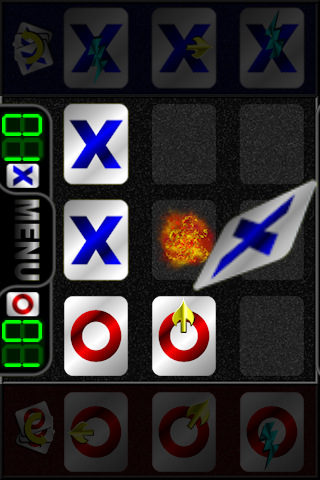
Tic Tac BLAM!! Explosive Take on an Old Classic!


Saturday, March 26, 2011
JustStickIt. We've got Your back!

Saturday, March 12, 2011
iPad 2, the First 12 Hours
So I have had the opportunity to spend a little time with the new iPad 2 and these are my thoughts on Apple's newest incarnation of the market dominating, iPad.
First of all, the device itself. The new iPad 2, as you likely know is thinner and lighter. The shape of it now, is more akin to a MacBook Air. It's edges are smooth and curved like the Air, not Flat sided or capsule shaped like the original iPad. It is also notably lighter than the original. The touch interface and screen have not changed, which to me is a nice bonus. I love the current iPad screen.
The iPad 2 also has two cameras on it now. A rear facing one and a front facing one. Both can be used in FaceTime and various other apps for video chat. The rear facing camera will also take HD video. Neither camera is as good as the camera on the iPhone 4, which is a little bit of a let down, but you can't win them all.
The heart of the beast has been increased drastically, viaApple's new dual core A5 CPU and a boost in RAM to 512 MB. Surfing the web, or any other media on the new iPad 2, is considerably faster than on the original. Web pages load in 2-5 seconds most of the time, from my experience. Netflix is up a hair faster, but loads the movie a lot quicker. Switching from task to task is smoother and the entire experience just feels snappier. Even typing on the new iPad 2 seems to be more responsive.
Battery life does seem to be just as good as it was, even with all the new speed it has. I very much look forward to some iPad 2 specific apps that will take advantage of the iPad2's new features and speed. And as always, I will be sure to keep you informed of my findings!
Enjoy and if you haven't already, go buy yourself an IPad 2!
- Posted using BlogPress from my iPad 2
First of all, the device itself. The new iPad 2, as you likely know is thinner and lighter. The shape of it now, is more akin to a MacBook Air. It's edges are smooth and curved like the Air, not Flat sided or capsule shaped like the original iPad. It is also notably lighter than the original. The touch interface and screen have not changed, which to me is a nice bonus. I love the current iPad screen.
The iPad 2 also has two cameras on it now. A rear facing one and a front facing one. Both can be used in FaceTime and various other apps for video chat. The rear facing camera will also take HD video. Neither camera is as good as the camera on the iPhone 4, which is a little bit of a let down, but you can't win them all.
The heart of the beast has been increased drastically, viaApple's new dual core A5 CPU and a boost in RAM to 512 MB. Surfing the web, or any other media on the new iPad 2, is considerably faster than on the original. Web pages load in 2-5 seconds most of the time, from my experience. Netflix is up a hair faster, but loads the movie a lot quicker. Switching from task to task is smoother and the entire experience just feels snappier. Even typing on the new iPad 2 seems to be more responsive.
Battery life does seem to be just as good as it was, even with all the new speed it has. I very much look forward to some iPad 2 specific apps that will take advantage of the iPad2's new features and speed. And as always, I will be sure to keep you informed of my findings!
Enjoy and if you haven't already, go buy yourself an IPad 2!
- Posted using BlogPress from my iPad 2
Saturday, February 12, 2011
App Review: Google Translate Saves the Day!
 If you are like me, you speak only one language well. You may be able to muddle through a couple others, but English is the only fluent language you have. Well, in today's modern world of interconnected communities, English alone is just not enough! In my town, we have a very large Spanish speaking community. I even have several Spanish speaking clients. Which often times makes communication a little difficult for my clients and I.
Enter Google Translate.
ZaggMate iPad Keyboard: A Review
 My wife had mentioned to me,, that if the iPad had a keyboard she would likely not need a laptop anymore. So I took the opportunity to purchase her a ZaggMate iPad keyboard for $99 at Best Buy
After letting her play with it for a while, I borrowed it from her, so I could give you my honest impressions with the unit.
Thursday, February 10, 2011
Verizon and the iPhone: First Impressions
 Early on Tuesday the 10th, I received my very own Verizon iPhone. FedEx diligently brought it right to my door, where my wife collected it and in turn, promptly called to give me the good news. I took off for home and collected my new phone. Getting it up and activated, was of coarse a breeze. Just plug it into your iTunes and wait a moment. Within moments of activating it, my text messages started flowing in. That familiar SMS app sure is a nice treat, after using a LG EvoTouch for the last year.
Wednesday, February 2, 2011
A look at Business Apps: LockInfo
As I have mentioned before, a big part of my job the last four years, has been to find new and innovative ways to incorporate iPhones and iPads into Microsoft Exchange environments. Most of my users are accustomed to Blackberries and they expect their iPhones to behave in the same manner. One of the largest complaints I received from my users early on was, there was no way to see your email and calendar at a glance. So being the good little Consultant that I am, I went in search of an answer. What I found, is nothing short of amazing!
First I would like to say, Apple made a HUGE mistake when they chose to not allow Apps and Developers to use the lock screen. The lock screen can do so much more and SHOULD do more. But nope. It just sits there with a clock on it and a pretty background. If you have an iPad, the problem is exacerbated by the fact that you have a HUGE chunk of prime grade A digital real estate sitting right there.. And what is on display? Your geeky Star Trek background and a clock. Well no more! This app changes all of that! And how do they do it, when Apple strictly forbids this type of behavior? Why they sell it on Cydia, that is how. Cydia is the Jail Broken App store, filled with themes and all manner of Apps that Apple would not allow onto the App Store. So first things first, you gotta Jailbreak your iDevice.
Once that is done, head on over to Cydia and buy LockInfo It is a steal at twice the price! Lockinfo allows you to display all kinds of information on your lock screen. For example, you can display you calendar, mail, text messages and missed calls on it right out of the box. That's not enough for you? Want to display the Weather or any other bit of info? No problem! LockInfo has a plugin system and people are all the time developing new plugins for all your favorite apps. I now run LockInfo on my iPad and just love it! It has never been easier to see if I have anything pending, or an important email has come it. I highly recommend this to everyone!
I was going to write you up a tutorial on how to install and use it, but iClarified has already beaten me to it and done a very nice job at that! So click this link and check it out!
First I would like to say, Apple made a HUGE mistake when they chose to not allow Apps and Developers to use the lock screen. The lock screen can do so much more and SHOULD do more. But nope. It just sits there with a clock on it and a pretty background. If you have an iPad, the problem is exacerbated by the fact that you have a HUGE chunk of prime grade A digital real estate sitting right there.. And what is on display? Your geeky Star Trek background and a clock. Well no more! This app changes all of that! And how do they do it, when Apple strictly forbids this type of behavior? Why they sell it on Cydia, that is how. Cydia is the Jail Broken App store, filled with themes and all manner of Apps that Apple would not allow onto the App Store. So first things first, you gotta Jailbreak your iDevice.
Once that is done, head on over to Cydia and buy LockInfo It is a steal at twice the price! Lockinfo allows you to display all kinds of information on your lock screen. For example, you can display you calendar, mail, text messages and missed calls on it right out of the box. That's not enough for you? Want to display the Weather or any other bit of info? No problem! LockInfo has a plugin system and people are all the time developing new plugins for all your favorite apps. I now run LockInfo on my iPad and just love it! It has never been easier to see if I have anything pending, or an important email has come it. I highly recommend this to everyone!
I was going to write you up a tutorial on how to install and use it, but iClarified has already beaten me to it and done a very nice job at that! So click this link and check it out!
Subscribe to:
Posts (Atom)